
Chapter 1 · 1.4
Nextcloud Free, Personal, Family and Max: differences and switching
WebOké offers four Nextcloud packages. They all work the same way, but differ in storage, number of users and extras. You'll find the current prices at www.weboke.nl/nextcloud.
| Free | Personal | Family | Max | |
|---|---|---|---|---|
| Type of Nextcloud | Shared (your own account) | Your own server | Your own server | Your own server |
| Storage | 5 GB | 250 GB, expandable to 500 GB | 500 GB, expandable to 1 TB | 1 TB, expandable to 2 or 5 TB |
| Users | 1 | 1 | 5 | 10, expandable to 100 |
| Manage users in My WebOké | No | Yes | Yes | Yes |
| Office (Euro-Office, Talk and more) | No | Option, 1 licence | Option, up to 5 licences | Option, up to 25 licences |
| AI Assistant with your own API key | No | No | Yes | Yes |
| Your own subdomain (cloud.yourcompany.com) | No | No | Option | Option |
| Help | Knowledge base and AI assistant | Ticket, AI assistant, WhatsApp and email | Ticket, AI assistant, WhatsApp and email | Ticket, AI assistant, WhatsApp and email |
Which package suits you?
- Free is for getting acquainted. You store a few files, your calendar and contacts, and discover how Nextcloud works.
- Personal is for one person who wants all their files, photos and calendar in their own cloud. With an Office licence, you can also edit documents in your browser.
- Family is for a family or a small team. Everyone has their own account and files, and you easily share folders, calendars and albums.
- Max is for companies, associations and larger teams. You expand storage and users as you grow.
Expanding or switching
You arrange more storage, extra users or Office licences yourself in My WebOké. Go to My Products and open your Nextcloud package. Under Configurable options, choose what you need and click Save options.
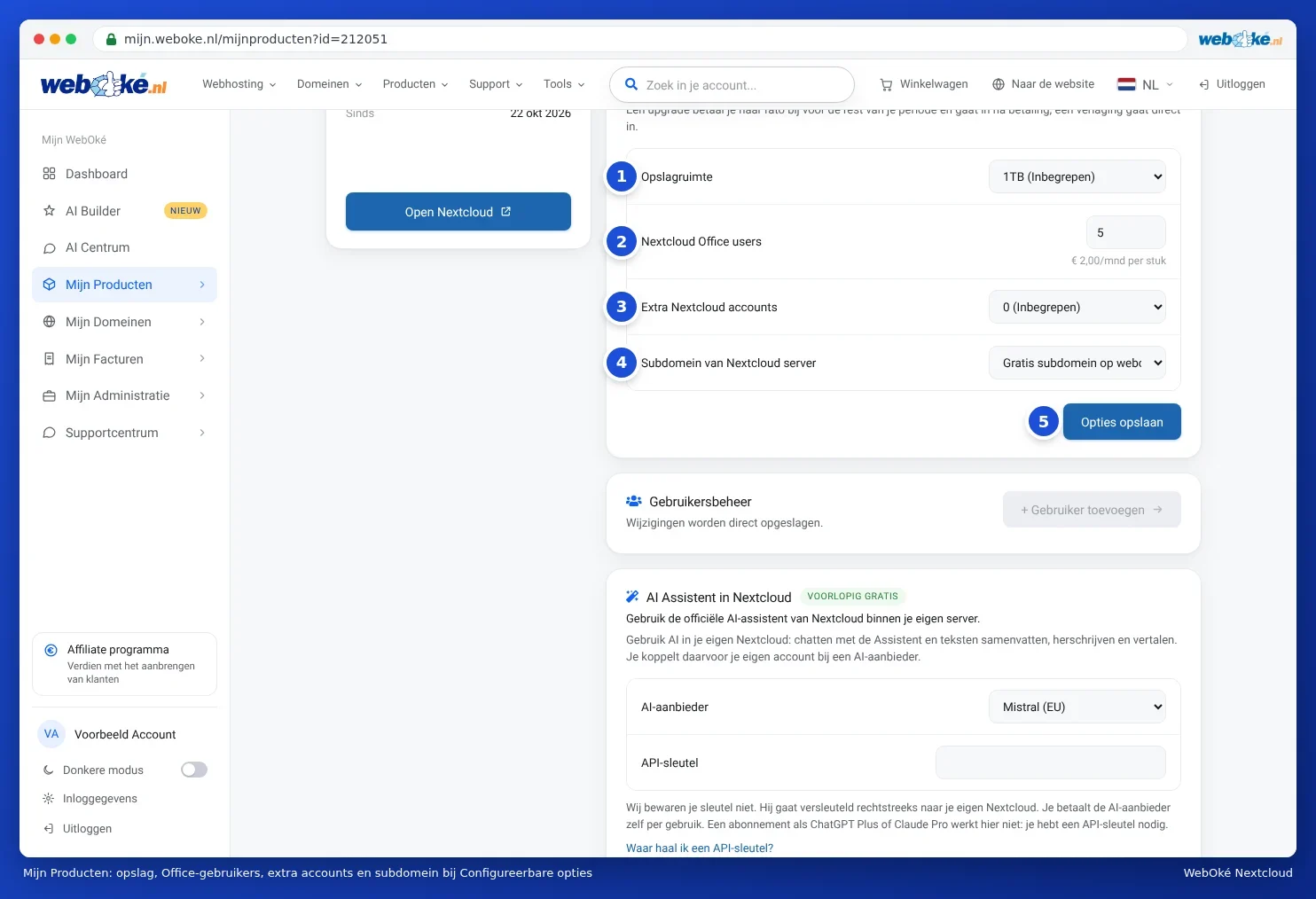
- An upgrade you pay pro rata for the rest of your period. It takes effect as soon as you've paid.
- A downgrade takes effect immediately. Just make sure your files fit within the smaller storage space.
- Moving to a larger package, for example from Personal to Family, is always possible. Your files simply stay in place.
- Moving from Free to a paid package means switching to your own Nextcloud. You can read how to bring your files along in From Nextcloud Free to a paid package, or from another Nextcloud provider.
Everything about managing your package, such as creating users and assigning licences, you can read from The package page in My WebOké onwards.